Multi-Org & Enterprise Support Update
Multi-Org Support Background
Previously, some users were already using two or more Claude organizations (workspaces). When using only one organization consistently, there were no major issues. However, switching between two organizations caused problems such as abnormal token usage calculations and repeated plan change notifications. We are currently working on multi-org support, and the major cases have been addressed.
If you experience any data issues or problems since the multi-org update, please submit a report via the inquiry form at the bottom of the dashboard. We'll investigate and fix it promptly.
Selecting Organizations to Track
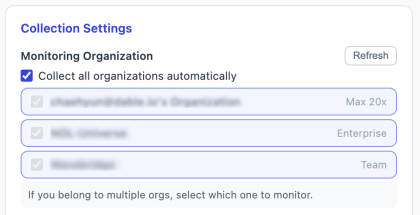
If you use two or more organizations, you can choose which ones to track in the extension options. Currently, up to 3 organizations can be tracked simultaneously, and all organizations are collected by default if you have 3 or fewer. However, if you have organizations you don't actively use, please exclude them from collection.
Choosing Your Main Organization
With extension v1.19.5 or later, your active organizations are listed in the popup. Select the one you primarily use, and your personal dashboard and team dashboard will display data based on that organization.
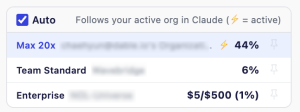
- Auto mode: When Auto is checked, the organization you're currently using in Claude is automatically set as your main (primary) organization. When you switch organizations in Claude, your main follows automatically.
- Manual selection: If you want to pin a specific organization as your main, uncheck Auto and press the Pin button on the desired organization.
- Personal Dashboard: Switch between organizations to view each one's data.
- Team Dashboard: Each member's data is displayed based on their selected main organization.
Since data is collected separately for each organization, choosing a main organization is simply a matter of display preference.
Data Continuity Notice
Previously, data was collected under the assumption of one organization per account. Starting with v1.19.5, the system assumes multiple organizations per email. This structural change may cause a break in data continuity around the update. We appreciate your understanding.
Enterprise Plan Support
We are introducing Spending trend charts for Enterprise (Usage-based) users for the first time. You can track spending changes, spending cap, and budget pace at a glance. Enterprise member spending charts are also available in the team dashboard member detail view.
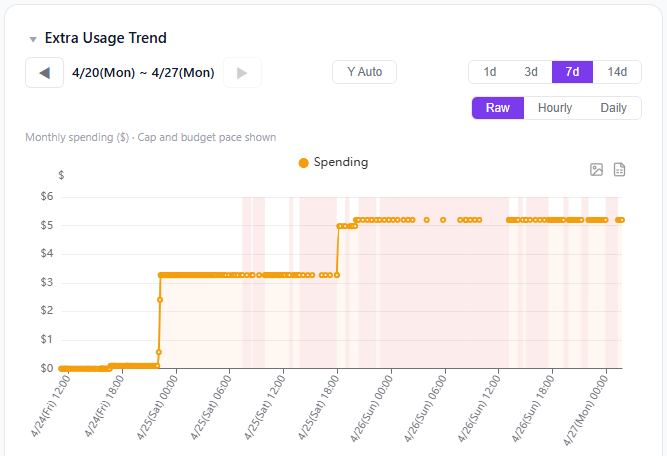
As Enterprise support has just been launched, please let us know if there are any features or improvements you'd like to see. We'll actively consider your feedback.
Extension Update
Extension v1.19.5 or later is required for full functionality. Chrome updates automatically, but you can force-update at chrome://extensions → "Update" button.
Acknowledgements
We sincerely thank the Wavebridge team for providing Team accounts and the NOL Universe team for providing Enterprise accounts for testing. Your support made it possible to verify the system across diverse environments.