Usage gauge now embedded in Claude.ai sidebar (v1.21.0)
While using Claude, the question "how much have I used?" comes up often. Opening the popup every time is inconvenient, and many users told us they wanted to know their usage before sending a message — especially when approaching the limit.
This update introduces two real-time usage display features.
Sidebar Usage
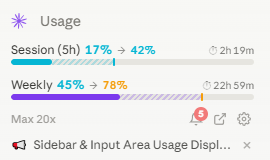
Session (5h) and weekly (7d) gauges are always visible in the left sidebar. You can see your current usage, predicted usage at reset, and time remaining until reset at a glance. When a 429 rate limit occurs, data refreshes immediately to reflect the latest state.
Input Area Usage
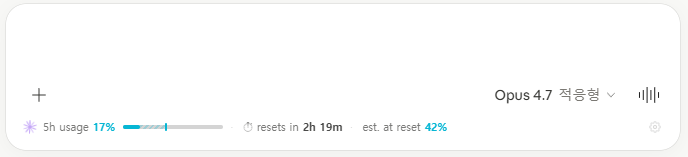
Your current 5h usage is shown compactly just above the message input box. This helps you quickly judge whether you have enough headroom before sending a long prompt, helping you avoid unnecessary rate limits.
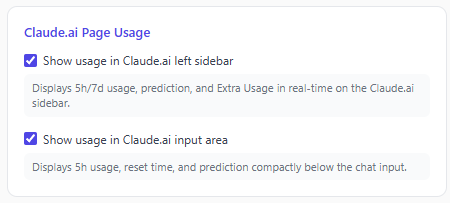
Both features can be individually toggled on or off in the extension settings, and are enabled by default.