Enhanced ChatGPT & Gemini support — use without Claude
Claude Tuner's support for ChatGPT and Gemini has been significantly enhanced. You can now use the dashboard standalone with just ChatGPT or Gemini — no Claude account required — and compare usage across multiple AI tools in one place.
Use without Claude
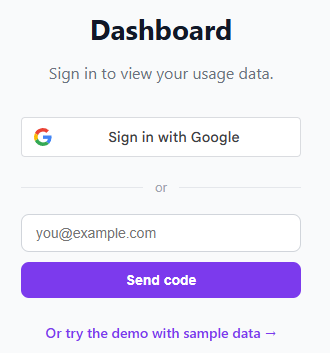
Previously, a Claude account was required for sign-up. With this update, you can register with email verification only, and full analytics are available even if you use only ChatGPT or Gemini. Especially useful if you don't have a Claude Pro/Max subscription.
Three visualizations
You can inspect your ChatGPT/Gemini usage patterns in three ways:
- Hourly activity chart — token usage distribution across 24 hours. Identify your peak working hours.
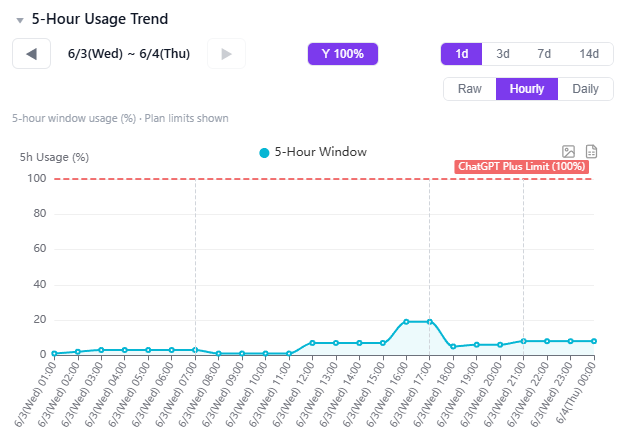
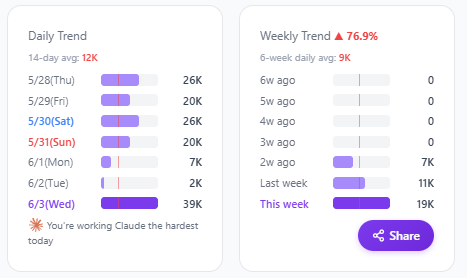
- Daily token usage card — at-a-glance view of today's estimated tokens and percentage of your plan limit.
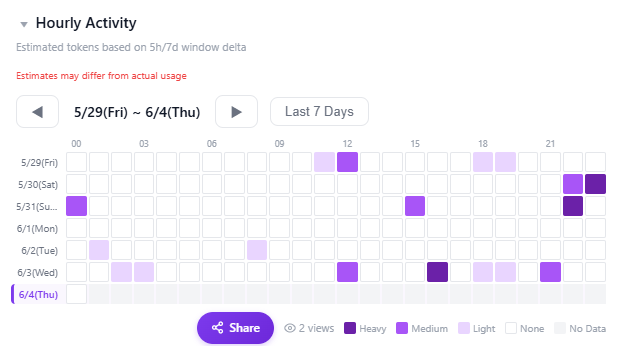
- Hourly usage heatmap — day-of-week × hour matrix showing your work patterns. Analyze weekday vs. weekend split, late-night usage, etc.
Since ChatGPT and Gemini don't publish exact token limits, we estimate via price parity with Claude Pro ($20/month baseline). Treat the numbers as a trend indicator rather than absolute values.
Alert reference — pin the extension
When multiple accounts are linked, this is how you choose which one drives alerts.
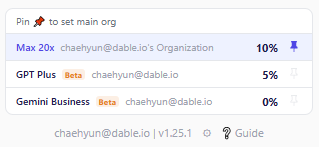
Pin the Chrome extension icon to your toolbar, and the pinned account becomes the "primary." You'll get browser notifications when its 5-hour or 7-day usage hits 80% or 100%.
Changing the pin instantly changes the reference account. Pin ChatGPT on a ChatGPT-heavy day, Gemini on a Gemini day — flexible.
Multi-account support — up to 3 per user
Up to 3 AI accounts can be linked under one user, in any combination:
- ChatGPT(Codex) + Gemini + Claude
- Claude multi-org (work + personal) + ChatGPT
- Personal Gemini + Work Gemini + Claude
- Any other combination
Switch between accounts quickly via the chip strip at the top of the dashboard. Each provider is tagged with a "GPT" or "Gemini" badge.
Getting started
- Install the Chrome extension — Claude Tuner
- Visit your AI tool's page (claude.ai / chatgpt.com / gemini.google.com) once
- The extension auto-collects usage and reflects it in the dashboard