Check your ChatGPT usage without ever leaving the page
Why we built this
Until now, checking your ChatGPT usage meant opening the extension popup or jumping to the dashboard — breaking your flow, and one more click every time you wondered "how much have I used?" Sometimes you'd hit a limit without warning. So we brought the in-page usage display — a favorite on claude.ai — to ChatGPT.
What's new
① Sidebar panel — a usage panel always visible in the left menu.
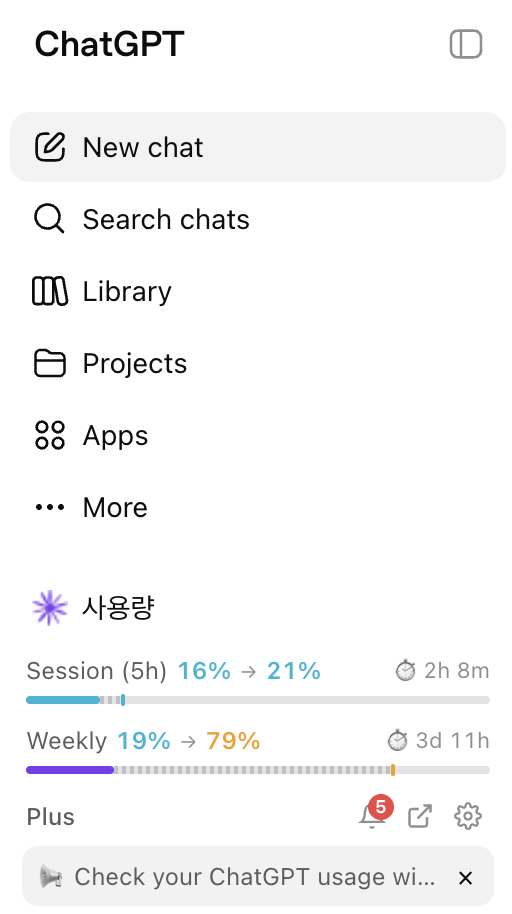
- 5-hour & 7-day usage as at-a-glance gauges
- Projected usage at reset based on your current pace
- Your current plan
- Claude Tuner announcements, right here
② Input strip — the essentials, compact, right under the composer.
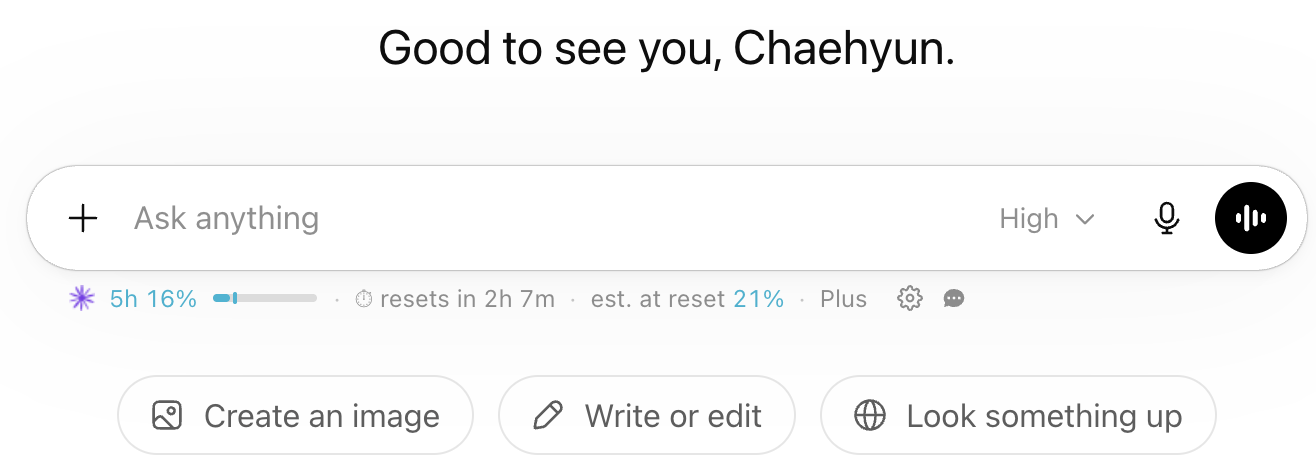
- 5-hour usage + a mini gauge bar
- ⏱ time until reset ("resets in 3h 23m")
- Projected usage at reset — turns amber/red as it gets risky, warning you before you run out
- ⚙️ Settings and 💬 Feedback buttons on the right (name & email pre-filled)
Why it helps
- Zero context switching — see usage live while you chat; no popup or dashboard needed.
- Predict limits — the projected-at-reset number tells you if your current pace will hit the cap, so you can pace yourself.
- No surprise cut-offs — color warnings make the danger zone obvious.
- One-tap support — hit a snag? File an inquiry straight from the strip, with the form pre-filled.
Turn it on
Extension options → enable "In-page Usage (ChatGPT)" + grant ChatGPT collection permission. The sidebar and input displays can be toggled independently.