All your accounts at a glance — the new Overview
Why we built this
Many Claude Tuner users switch between multiple Claude organizations (work, personal, etc.) or use Claude, ChatGPT, and Gemini together. Until now, the popup only highlighted one account at a time — to check another, you had to switch back and forth, and it was easy to miss that a different, heavily-used account was approaching its limit.
We kept hearing “I just want to see the essentials of all my accounts in one place.” This update does exactly that.
✨ What’s new
A “Overview / Detail” tab now sits at the top of the popup.
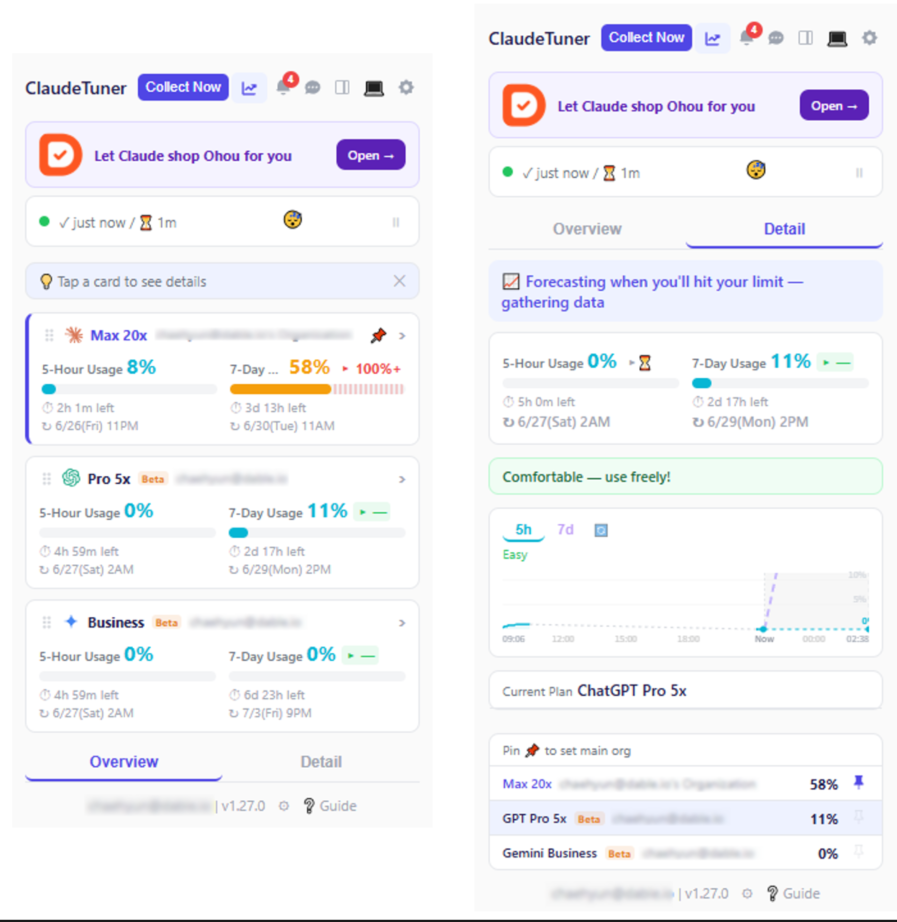
- Overview — every account you have, laid out as cards. Each card shows the four things that matter most:
- 🔹 5-hour and 7-day usage
- 🔹 Projected usage at reset (will you hit the limit before it resets at this pace?)
- 🔹 Time until reset
- Detail — the familiar detailed view (gauges, charts, recommendations), unchanged. Click a card to jump straight into that account’s detail.
👍 Why you’ll like it
- See everything at a glance — check every account from one screen, no switching.
- Never miss a limit — projected usage is color-coded (green / amber / red), so an account nearing its limit jumps out.
- Order it your way — drag the cards into any order; the order syncs across your devices. (Put your most-used account on top!)
- Clear at a glance — Claude / ChatGPT / Gemini logos show which service each card is.
- Remembers your last view — close on the detail screen and you’ll return there next time.
- Straight to the dashboard — click the chart in the detail view and it opens the dashboard for the exact account you were viewing.
Who sees it
Overview appears automatically when you have 2 or more accounts. With a single account, the detail view opens directly — nothing changes for you.
Whether you run one account or many, we’ll keep making it fit the way you work. 🙌