Check your Gemini usage without leaving the page
Why we built it
The in-page usage display that landed well on Claude and ChatGPT is now on Gemini too. Instead of opening the extension popup or a dashboard, you can see your Gemini usage right on gemini.google.com — without breaking your flow, and with early warning before you hit a limit.
What's new
① Sidebar panel
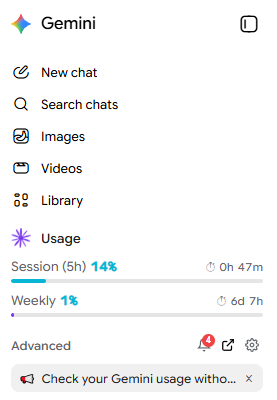
- 5-hour and 7-day usage at a glance, as gauges
- Predicted usage at reset, based on your current pace
- Current plan (Free / AI Pro / AI Ultra / Business, etc.)
- Blends into Gemini’s native menu (with hover highlight)
- Claude Tuner notices show here too
② Input strip

- 5-hour usage + a mini gauge bar
- ⏱ Time remaining until reset
- Predicted usage at reset (color warning system)
- ⚙️ Settings · 💬 Feedback buttons on the right
Why it helps
- Zero context-switching — never leave the Gemini screen
- Limit prediction — see what % you’ll be at by reset
- No surprise cutoffs
- Quick feedback — ask right where you are
How to enable
Extension options → turn on “In-page Usage (Gemini)” + allow Gemini collection