Claude Tuner now requires you to sign in
Until now, Claude Tuner worked without a separate sign-in. Install it and the usage read from your Claude / ChatGPT / Gemini account — identified by the email address on it — went straight to our servers. You already have to sign in to those services, so we thought sparing you one more sign-in was worth it.
That convenience came with a problem.
What was wrong
When the extension sent usage to the server, there was no way to confirm the request really belonged to that person. The shared key inside the extension is something anyone can read out of it, and with just that key you could send usage under any email address.
You might wonder who would bother sending usage under someone else’s address. Because of the organisation features, a handful of abuse cases were reported to us — and confirmed.
This does not mean anyone could look at your data. But it did mean someone could push fake records into another person’s account, which skews that person’s usage charts and plan recommendations. Showing your usage accurately is the whole point of this service, and we could not guarantee that accuracy.
So we added a sign-in step. New installs must sign in before anything is stored server-side, and existing installs are moving to the same rule.
What happens if you do not sign in
The extension keeps working. Collection, the popup charts, and the warnings when you approach a limit all continue regardless of sign-in. Using it locally is not a problem.
What you lose is everything that depends on syncing to the server:
- Your dashboard is empty — before you sign in your history lives only in this browser, so there is nothing to show.
- You cannot use the dashboard’s analysis — full history, hourly token usage, usage against your plan, plan recommendations, the weekly report email and the team dashboard all run on records stored server-side. The popup only shows recent activity.
- Usage from several computers never merges — if you use a desktop at work and a laptop at home, each browser holds only its own history. You cannot see what you used in total this week. Signing in brings them together under one account.
Two ways to sign in
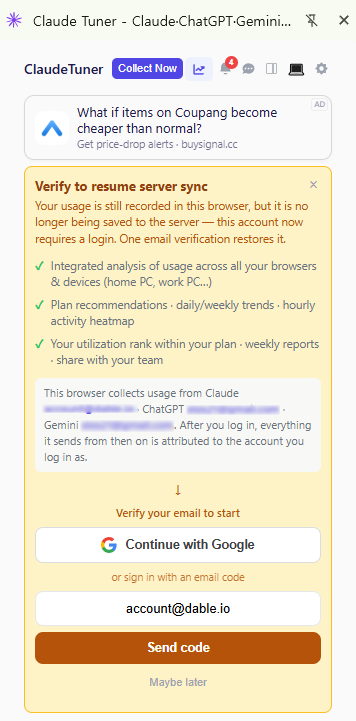
1. From the extension — use the sign-in button at the top of the popup. Sign in with Google, or if you do not have a Google account, enter an email address and sign in with the verification code we send.
2. From the dashboard — sign in to the dashboard in the same Chrome profile where the extension is installed. The extension picks up the authentication automatically; you do not need to sign in again there.
Any account will do
Your Claude Tuner account does not have to match your Claude, ChatGPT or Gemini account. If you use Claude on a work address and ChatGPT on a personal one, just sign in to Tuner with whichever is convenient.
When you sign in, we ask whether the accounts being collected in that browser belong to you. Confirm, and usage from those different services collects in one place. You can undo the link later, and you can switch to a different account from the popup.
If you were already using it
Nothing stops sending today. Your existing history is intact and collection continues.
That authentication was created without a sign-in, though, so it is not something we can keep supporting indefinitely. When it is retired, new records will stop reaching the server until you sign in. Doing it now means you will not run into that later. It takes a few seconds.
If you opened the dashboard and found it empty, this is almost always why. Sign in and your history starts accumulating from that point.