ChatGPT & Gemini, now in your team dashboard
As Codex (ChatGPT) has gotten noticeably better, far more teams are using Claude and Codex together. We kept hearing the same request: "our team doesn't just run on Claude — we're on ChatGPT and Gemini too, and we'd rather not check three separate places. Show us all of it in one." Today we're shipping the first piece of exactly that.
Why we built this
A year ago most teams had settled on a single coding AI. Not anymore. The same developer refactors with Claude in the morning, runs reviews through Codex in the afternoon, and opens Gemini when they need search. At the team level, "who uses what, and how much" ends up scattered across services — making it hard to even tell whether licenses overlap or sit unused.
Until now, Claude Tuner's team dashboard assumed your team runs on Claude. But real teams mix several AIs. So we're expanding multi-service support step by step, so you can see and manage your team's entire AI stack on one screen. This is the start.
https://claudetuner.com/dashboard/team/?demo=true&org=99
https://claudetuner.com/dashboard/team/?demo=true&org=99&tab=costs&rank_month=2026-07
What's new
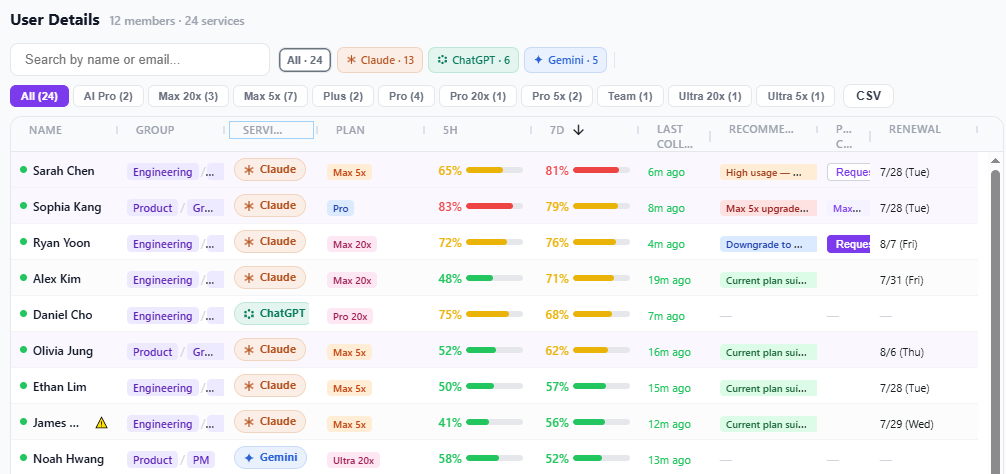
- User Details table — the member list below the team overview now expands to one row per service when someone uses more than one. Each row shows the plan and usage for that person on that service. (Members who only use Claude still appear as a single row, just like before.)
- Plan colors = tier-based — similar tiers share a color across services. Claude Max 20x, ChatGPT Pro 20x, and Gemini Ultra 20x all fall in the same top-tier color family, so you can read someone's tier from color alone.
- Service filter — tap Claude / ChatGPT / Gemini above the table to see only the people using that service.
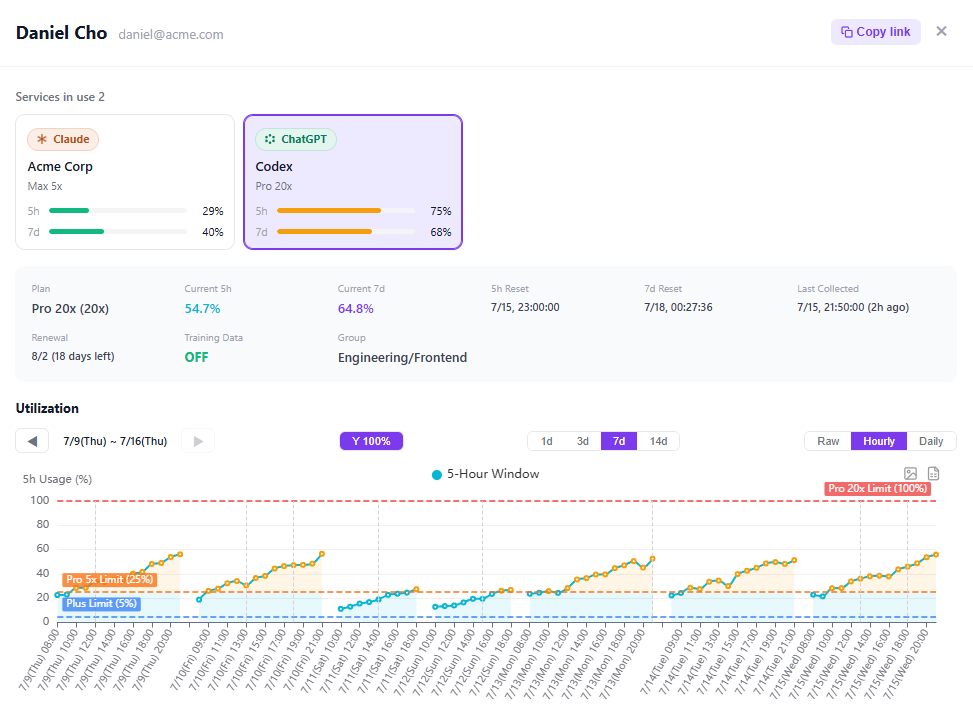
- Per-user detail — click any user to open their per-service usage history (daily trend, hourly tokens, usage against limits). If they use multiple services, switch between them at the top to inspect each history.
- Deep links that just open — copy the URL from any user + service view and paste it to a teammate; it opens straight to that view.
What you get
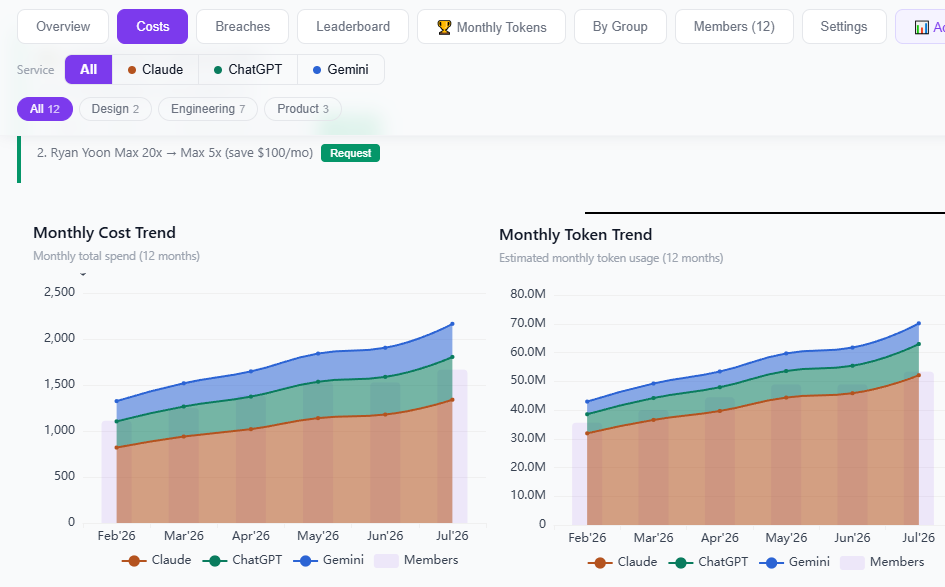
- Everything in one place — see which AI services and plans your team uses without hopping between three consoles.
- Cost & license cleanup — people on top plans (20x, Ultra) with low actual usage — and those constantly hitting limits — stand out immediately, giving you a basis to right-size plans.
- Spot overlap & waste — instantly see whether someone holds several paid plans for similar purposes, and where usage concentrates across the team.
You control what's shared
Transparency and privacy shouldn't be at odds — so you decide what's shared.
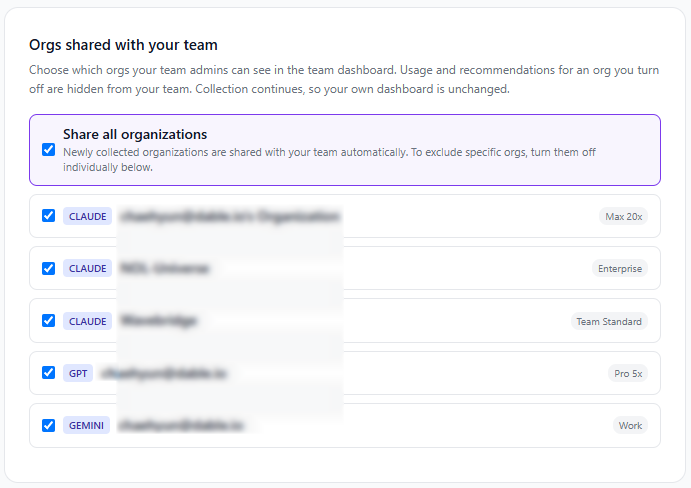
- Settings → "Orgs shared with your team" — turn each of your orgs (your Claude, ChatGPT, and Gemini workspaces/accounts) on or off to choose which ones your team sees.
- Everything is shared by default, and newly collected orgs are shared automatically — so nothing quietly drops out of view later.
- Just switch off any org you'd rather keep private. Its usage and recommendations are hidden from your team, but collection continues, so your own dashboard is unchanged. (At least one org must stay shared for team features to work.)
Now across your services
The service filter at the top now splits the leaderboard, breach alerts, monthly token ranking, and group analysis across Claude, ChatGPT, and Gemini — and the Team Race reacts to the selected service too.
A few natural differences remain, because each service exposes different data. Gemini doesn't report token counts (especially on Workspace), so it's not in token-based rankings or the leaderboard's token view. ChatGPT has no 5‑hour limit window, so it's left out of utilization-based views like the Team Race and 5‑hour breach. Rather than force-merging numbers that would end up wrong, we show only what each service actually reports — and we'll keep filling in the rest as the data allows.