Introducing team dashboard access control — you decide who sees what
What's new
Organization admins can now control which members’ Claude usage each person can see in the team dashboard. You can set access per member, and define a default that applies to everyone who joins from now on.
Why we built it
Until now, there was no concept of view access at all. Anyone who could open the team dashboard could see the Claude usage of every member in the organization. That was fine for small teams — but for organizations with 100+ members, many people felt uneasy that everyone’s usage, including their own, was fully visible to all colleagues.
To address this, we built a three-level access control that lets you match usage visibility to your organization’s needs.
Three access levels
- All departments — Can see member data across all departments.
- Own department — Can see only members of their own department.
- No access — No access to the team dashboard.
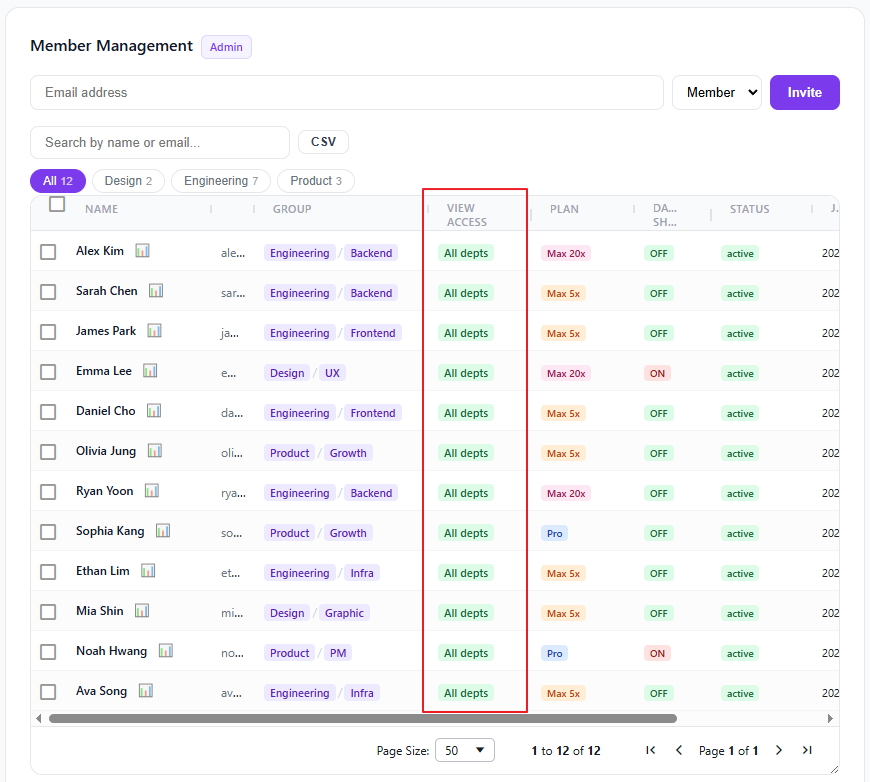
Admins can assign each member’s level individually from the member list.
Set a default for new members
So you don’t have to adjust access on every single join, you can set a default that applies automatically to future members. Privacy-conscious orgs can default to "Own department" or "No access"; transparent teams can keep "All departments".
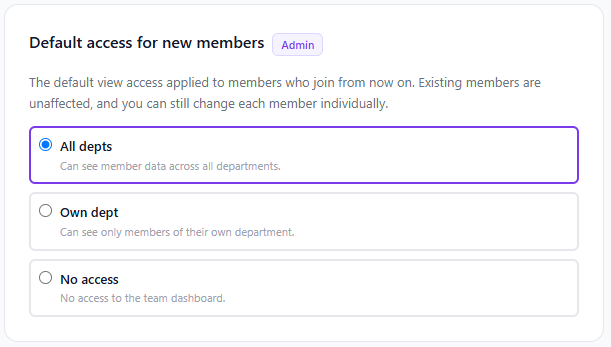
The default is "All departments." If you change nothing, everything behaves exactly as before — no change to how you use it today. Adjust only when you need finer control.
What it does for you
- Eases privacy concerns: Relieve the discomfort of full usage exposure in large orgs by setting least-privilege access.
- Flexible for your culture: Choose fully private, department-scoped, or fully open.
- Less admin overhead: Set the default once and it applies to future members automatically.
- Existing members unaffected: The default applies only to members who join from now on.
- Admins always see everything: Admins keep full visibility regardless, so you can never lock yourself out.